Showing posts with label ios. Show all posts

Wednesday, April 22, 2015

Mobile Device Management: An MDM Primer for Schools, Non-Profits and Small Business

Mobile devices are infiltrative every aspect of our lives, and that includes education.  Many schools, non-profits and small businesses struggle with the hows, the wheres and the whys of mobile devices on their networks and in their classrooms.  And even as the pedagogical debate rages on about the efficacy of iPads or Chromebooks in the classroom, one thing is for certain: these devices are in your classrooms.  And if they are in your classroom, they are on your network -- and therefore must be managed!


Mobile Devices Are All Around You
More organizations than ever are confronting how to fully embrace mobile devices beyond their executive and sales teams. In a way, IT teams are being dragged into this. Many users have fully incorporated smartphones and tablets into their daily lives thanks to devices and operating systems from Apple and Google. They are choosing the personal user experience of Android and iPhone over the largely business-task-driven BlackBerry devices. They have also adopted application stores in their personal lives, blending activities like web browsing, games, and mobile payments with business uses such as corporate email. The drive to combine the personal aspects of these devices with business functions has created a need for control management of these devices.

So why is it taking so long for schools and non-profit organizations to officially assimilate mobile devices into their organizations? There are a number of reasons, but the biggest is that most of these organizations want to drop the issue into the lap of their IT folks and have them create organization policy in addition to the IT tasks. They put the cart before the horse.

The Essentials: Start with a Strong Foundation
Regardless of your business, industry or users, there are certain basic and advances practices that you should be following. Here are the best practice that will be covered in this series:

  1. Be Realistic with Your Policy
  2. Gain Insight into Who’s Mobile and What They’re Doing
  3. Cover the Basics: Passwords, Encryption, and Remote Wipe
  4. 1,2,3 to Good Policy
  5. Make it Simple to Get Up and Running
  6. Let End Users Take Care of Device Management
  7. Start Planning for Centralized Control
  8. Spread the Word about Your Progress

And some Advanced Practices: Build Upon Your Foundation

  1. Get a Grip on Usage Costs
  2. Automate Compliance Management
  3. Manage Application Restrictions and Your Own Application Storefront
  4. Provide a Backup & Recovery Service

1. Be Realistic with Your Policy
Policy is king... right?  Your policy should:

  1. Support multiple device platforms
  2. Allow personal devices

Frankly, nearly all organizations are doing this now. They just don’t know it. Odds are that you have a policy that says what your computers can and can not do -- right? That you say if your staff can use personal laptops or not? Right? (Let's assume you said yes... because you should!)

You need to be doing it for your mobile devices, too! And it is far more important than you think. You probably have a lot more personal iOS, Android and Windows Mobile devices inside your organization than you think. After all, it’s easy for any mobile device to integrate with mail infrastructure like Exchange using the Activesync functionality you turned on. It is simple for your end users to set up Exchange or Google Apps on their iPhone or Android device. Trust me, they are doing it -- and you need to support it, so you can manage it.

2. Gain Insight into Who’s Mobile and What They’re Doing
Making decisions and quantifying risks about mobile devices is hard without good data on the mobile devices in your environment. For instance, it’s not uncommon for terminated employees to still be using corporate mobile devices—but you can’t stop this unless you know about it.

With a lightweight reporting and inventory tool, you can keep tabs on how mobile devices are being used and by whom.

Make sure the solution:

  1. Empowers your helpdesk to troubleshoot devices
  2. Is accessible outside of IT. For example, your HR process needs to have access during exit interviews to turn off devices for employees when they leave the organization.
  3. Includes strong application inventory and search capabilities

3. Cover the Basics: Passwords, Encryption, and Remote Wipe
Be sure to do the following:

  1. Require a strong password of at least four characters
  2. Set up devices to automatically lock after 5-15 minutes of inactivity
  3. Configure devices to automatically wipe after a certain number of consecutive failed login attempts or if they are reported lost
  4. Enable a level of encryption

Some organizations may want to consider more protection. But before you put yourself in that category, ask yourself one question: Do we enforce this level of security on our laptops?

4. 1, 2, 3 to good policy
You may be worried that you’ll need a new solution to implement the first three best practices. That isn’t necessarily the case. If you have a BlackBerry Enterprise Server, then you are covered on that platform. And with Exchange or Lotus Notes, you can enforce your PIN policy and remote wipe your iPhones, iPads, and Windows Mobile devices. (Android added this Exchange-based security control in version 2.2.) And let's not forget that your Apple Mac OS X Server has a certain level of device management built into it.

Following the principles we’ve already outlined is a responsible approach that takes advantage of existing infrastructure for device and risk management. And it’s a smart one considering that you really can’t stop people in your environment from using mobile devices.

The biggest issue with this approach is that reporting is limited and not scalable—you’ll need to develop and run reports manually, and deal with the lack of a centralized view into all devices.

But taking the first step with reporting and inventorying can dramatically improve your current posture on the uber-popular iPhone and Android devices. Then you can plan a more scalable and robust management
and security solution (as described in the next best practices). In the meantime, click here for our free ActiveSync reporting tool.

5. Make it Simple to Get Up and Running
Don’t make IT responsible for reviewing each request for device and system access. Instead, empower users to enroll their own devices by visiting a single URL. Set up a default policy that approves the users’ devices and pushes down their e-mail and your organizations Wi-Fi profiles. This will create efficiency in your technology footprint, take a burden off your IT department and make your end-users a lot happier.

In addition to making the process easy for end users, simplify things for IT and create innate security on your network. For example, your policy could specify that any Android device with OS 2.2 or above is automatically granted access to corporate systems, while any Android device on an earlier OS version is automatically blocked.

6. Let End Users Take Care of Device Management
With employees relying on mobile devices to get their jobs done, you don’t want basic device management issues to get in the way of productivity. You also don’t want users calling the helpdesk with issues they can resolve themselves. Empower end users with a self-service portal that allows them to:

  1. Enroll their own devices
  2. Lock and wipe their own devices if think they’ve been stolen
  3. Reset their own passcodes
  4. Locate their lost devices

...all without ever calling your IT department!

7. Think About and Plan for Centralized Control
If you have Blackberries, your BlackBerry Enterprise Server is probably well entrenched, both operationally and economically. But it is not multi-platform, and a multi-platform solution is needed to support the variety of devices in your environment.

Consider these four cutting edge best practices:

  1. Adopt an MDM platform that can also manage PCs and Macs as well as mobile devices. The lines between laptops, tablets, and smartphones will continue to blur in both user functionality and IT operations. A versatile MDM solution will cut down on infrastructure costs, improve operational efficiency, and create a single user view into devices and data for operations and security.
  2. Be sure your reporting and inventory tool consolidates both your existing devices and your multi-platform MDM solutions. You’ll rely on your data and reports daily, and you’ll want to avoid any manual processes to access your business intelligence on mobile devices.
  3. Take a look at cloud-based MDM services. When you account for full Total Cost of Ownership (TCO), a LAN-oriented management solution can be costly. Why use a more expensive—and wired— solution to manage remote mobile devices?
  4. Go the agent route with caution. If you can meet your needs with server-side management controls, all the better. Thinking long term, going agent-less is likely to save you a lot of time and effort when moving between different types of devices and platforms. An agent-based solution often requires touching devices or additional support from the IT department to make it all work.

8. Spread the Word about Your Progress
Report on and discuss your mobile device inventory and policy status— including personal devices—in your IT operations reviews. It’s a good way to broaden the discussion beyond those responsible for managing devices in your environment. It’s also an opportunity to raise the visibility of the benefits for your organization, as well as for future resource requirements such as needed involvement from those responsible for security and other areas of IT. Your inventory and reporting tool should make it simple to produce the reports to start conversations in these meetings.

Is It Designed for Any Environment?
The practices we’ve discussed so far should meet most organizations’ needs. In fact, they satisfy the most stringent security and privacy regulations, such as those dictated by the HIPAA, FINRA, and PCI DSS. These regulations only require, in practice, that organizations encrypt their data and are able to destroy data on a lost device. The essential practices cover that and more.

Build Upon Your Foundation with Advanced Practices
With the essentials in place, your organization is primed for an effective mobile IT operation in the near term. Now you need to determine whether or not your organization needs to go a step further with advanced practices.

9. Get a Grip on Usage Costs
You need to be able to track, monitor, and restrict network usage. After all, the costs for international data roaming can reach thousands of dollars per trip. Even domestic usage can quickly add up - it is worth keeping an eye on it for your own sanity, and at some point -- your boss is going to ask about it!

10. Automate Compliance Management
IT needs a way to automatically detect devices out of compliance with policy—and automatically respond. For example, your policy may specify that jailbroken or rooted devices are not allowed in the corporate environment and if one is detected, you will immediately revoke access to corporate systems. Ideally, the detection and revocation should happen automatically. At the same time, you want to automatically notify the user of the action being taken and what’s needed to come into compliance and regain access to corporate resources. Once the device is in compliance, access should be automatically reinstated.

11. Manage Application Restrictions and Your Own Application Self-Service Storefront
Today, most smartphone and tablet vendors do a good job of limiting usage to certified and approved applications. Some would argue they do too good of a job restricting access. Other vendors maintain a very open policy for creating applications, with no formal process for certifying apps. That said, certain organizations or industries may need to restrict the type of application allowed on a corporate-approved device.
If you want to be proactive about it, set up your own enterprise application storefront. This allows you to present a list of approved applications and ease their delivery to mobile devices. Plus, your users will know where to go for these applications and for updates. Some MDM-solution providers can even help you deliver documents such as PDFs to devices.

12. Backup and Recovery for Devices

If any of your users work with critical and unique data beyond email, you may want to consider using a backup and recovery solution. Those using an iPhone or an iPad can rely on iTunes to take care of this. Just make sure your policies are set to force an encrypted backup. For those not using iTunes for backup, you’ll probably need to address specific use cases.

In addition to this MDM primer, I have written Mobile Device Management product overviews for four popular MDM solutions that play nicely in schools, non-profits and small businesses.  Click the links below to read those overviews and help you decide if one of these might be right for your organization!

JAMF Casper Suite Overview
IBM/Fiberlink Maas360 Overview
Miradore's MDM Overview (Free product)
Barracuda's MDM Overview (Free product)


~~~~
Bruce has worked in educational technology for over 18 years and has implemented several 1:1/BYOD programs.  He also has served as a classroom teacher in Computer Science, History and English classes.  Bruce is the author of five books: Sands of Time, Towering Pines Volume One:Room 509, The Star of Christmas, Philadelphia Story: A Lance Carter Detective Novel and The Insider's Story: A Lance Carter Detective Novel.  Follow Bruce's Novel releases by subscribing to his FREE newsletter!

Be sure to check out Bruce's Allentown Education Examiner Page, his Twitter and his Facebook!

Tuesday, December 2, 2014

Little Clever's Learning Apps for Preschoolers

It's simple... it's easy... and most of all, it is fun.  The Apps created by Little Clever speak to your preschooler in a way apps haven't been able to in the past.  The company is on a mission to create apps that help your preschooler develop critical thinking skills coupled with the mechanical skills that are necessary as they grow older in a technical world.  They create games that support children's learning and development through fun, interactive games that help develop hand-eye coordination, pattern recognition, numeracy and language.


Currently, they have two apps.  Both are available for your Apple iOS, Android, Amazon Kindle and Windows Mobile devices -- and couldn't be easier to download and install for your little one.  Both games respect your privacy by not collecting any data about you, or your little one's gaming habits and there are no advertisements at all -- plus work great in "Airplane Mode" so that they can play the games any time, anywhere. 

The first game they offer is completely free!  The 21 Animal Puzzles for Children app features 21 different animal themed puzzles, each with 7 levels of difficulty giving you a total of 147 different puzzles!  These animals can come from one of two areas:  The Farm or The Riverside.  The difficulty on the app can be set to adapt to your child's progression and has some really great, friendly and fun sounds and voices in it!


The second game is not free, but features 101 different animals from 9 different places (The Farm, Riverside, Woodland, In The Sea, Africa, In the Garden, Dinosaurs, Pets and Around the World).  This app would literally be a never ending source of animal puzzles for your preschooler!

Want to know more?  Visit them at LittleClever.Com and check out the promo video below!


~~~~~
Bruce has worked in educational technology for over 18 years and has implemented several 1:1/BYOD programs.  He also has served as a classroom teacher in Computer Science, History and English classes.  Bruce is the author of five books: Sands of Time, Towering Pines Volume One:Room 509, The Star of Christmas, Philadelphia Story: A Lance Carter Detective Novel and 
The Insider's Story: A Lance Carter Detective Novel.  Follow Bruce's Novel releases by subscribing to his FREE newsletter!

Be sure to check out Bruce's Allentown Education Examiner Page, his Twitter and his Facebook!

Tuesday, November 18, 2014

Technology in Sports Education: Scorekeeping with GameChanger

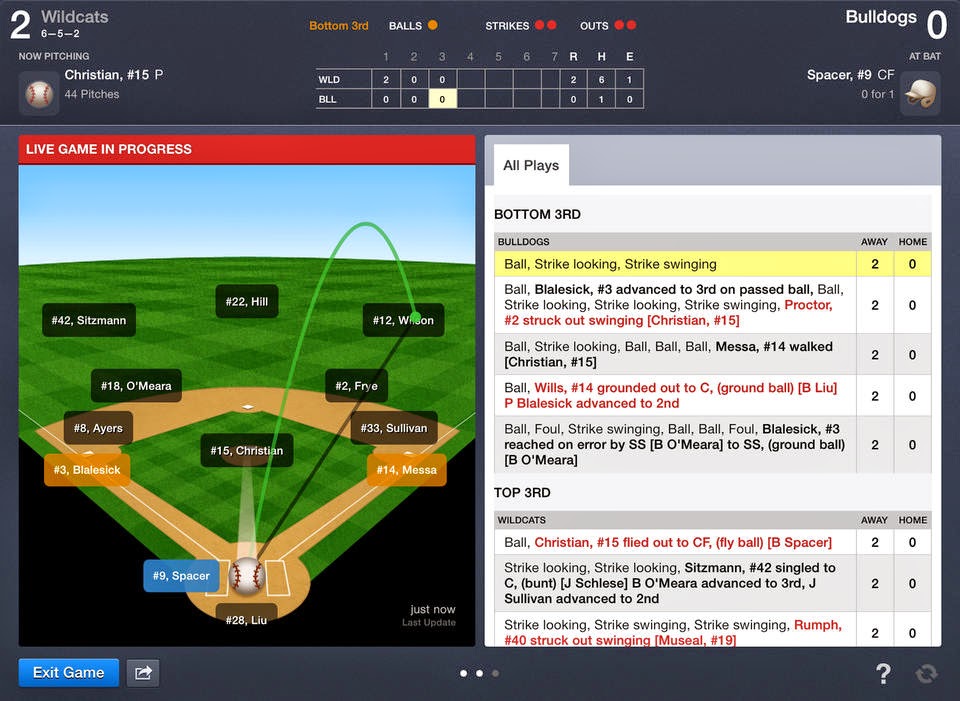
Little known fact:  I have also coached baseball at the American Legion, JV and Varsity High School levels... oh yea, and there was that year of T-Ball, too :).  In that time I've watched how the business of youth baseball has morphed and changed over the years.  I recently posted about using Coach's Eye to help elevate your players performance, and that is just one thing that we've come to rely on when we are taking care of business on and off the field.  One of the big elephants in the room is scorekeeping.  Youth sports have become almost as heavily followed as college athletics in some areas, and the GameChanger app for iOS is the industry leader is keeping the score, and telling all the fans about it!  The app currently works for baseball, softball and basketball.


GameChanger is easy for you to get into.  The App itself is free.  This allows you to input your rosters, your opponents, location of game and then you keep score.  It is that easy.  Could it be easier?  Yes -- it could, and GameChanger is all over it.  Because, not only does it allow you to do all the advanced statistical score keeping that every coach really wants and needs, but it takes advantage of the touch interface to do it!  That's right -- you draw on the screen to tell it what happened!  Did Bobby just hit a single to right field?  Draw a line into right field, then draw a line that moves Bobby to first -- that's it!  It records that on a 2-1 count, with 2 outs, Bobby hit a shallow single to right field.  This allows you to project exactly what Bobby's batting average is on 2-1 counts, and with 2 outs... and how often he hits the ball to right field!  Did Bobby steal second on a 2-0 count?  Chart that pitch, and drag Bobby to second -- it will ask if it was a Passed Ball or Stolen Base and that's it!  Same stat keeping depth!  And what's more, anyone can do it!  They don't have to be a baseball expert to keep score!  

Now you are saying, "WOW!  This is too good to be true!  Do you mean my managers can keep accurate score of my game for me -- and it is free?!?"  Yup.  That's it.  But it gets better.  Not only that, but if you are connected to the Internet while scoring the game (and many of us are these days -- plus it does work on iPhone), it will update the score and at-bats in REAL TIME!  Parents who can't be at the game can follow it pitch by pitch, and at-bat by at-bat!  And after the game, it generates a box score for everyone on your fan list to view!

Is this all free?  Well, no... all of that is not free.  The score keeping is.  For the other features there are membership plans on GameChanger.Com that really bring it all together, but the cost is low and the good will you will generate for your athletic program is priceless!  Check out the video below -- and get your Game Changer!


~~~~~
Bruce has worked in educational technology for over 18 years and has implemented several 1:1/BYOD programs.  He also has served as a classroom teacher in Computer Science, History and English classes.  Bruce is the author of five books: Sands of Time, Towering Pines Volume One:Room 509, The Star of Christmas, Philadelphia Story: A Lance Carter Detective Novel and 
The Insider's Story: A Lance Carter Detective Novel.  Follow Bruce's Novel releases by subscribing to his FREE newsletter!

Be sure to check out Bruce's Allentown Education Examiner Page, his Twitter and his Facebook!

Friday, October 17, 2014

Introduce kids to robotics with ROMO: Your Personal Smartphone Robot!

One of the things I love the most about working in educational technology is coming across something neat, fun and educational to share with students.  While surfing on Niftyreads.com I came across a couple of things, but this one really caught my eye.


It's called Romo: the Smartphone Robot!  


While Romo was largely designed to entertain you, if you look at what it is and what it does there are a number of educational opportunities here.  Romo is a fully motorized, durable plastic base with tracks and gears that enable its movement.  The base is controlled by an app that runs on your iPhone (sorry Android, that support it supposed to be in the works).  The iPhone is connected via the headphone jack (which may be a little awkward given that they are on the bottom now - this picture is using an iPhone 3G) and delivers its commands through this interface.  Simple plug-and-play!   You can also control it via your iPad with your iPhone plugged in -- very cool stuff!

But the fun is in the missions that are included in the app.  The missions allow students an entry-level method to get into robotics and how robots work that is different from LEGO MindStorms.  The programming is simple, yet allows for a great deal of complexity in what you ask Romo to do.  I think that this product has direct implications for grades 4-8, and maybe even some introduction to robotics courses in high school that might move on into LEGO MindStorms.  Check it out!


~~~~~
Bruce has worked in educational technology for over 18 years and has implemented several 1:1/BYOD programs.  He also has served as a classroom teacher in Computer Science, History and English classes.  Bruce is the author of five books: Sands of Time, Towering Pines Volume One:Room 509, The Star of Christmas, Philadelphia Story: A Lance Carter Detective Novel and 
The Insider's Story: A Lance Carter Detective Novel.  Follow Bruce's Novel releases by subscribing to his FREE newsletter!

Be sure to check out Bruce's Allentown Education Examiner Page, his Twitter and his Facebook!

Thursday, October 2, 2014

Keep Your Class Going with MobileMunky

One of the biggest challenges that teachers face in a 1:1 classroom environment is the "My battery isn't charged!" problem.  Some schools have thought ahead a bit and put in charging stations in classrooms or common areas, but what happens when you are right in the middle of class and that iPad or Android tablet just dies...?

You pull out your MobileMunky!


MobileMunky is a small, light and easy to use device that allows you to charge your mobile devices on the fly -- and continue to use them at the same time!  Obviously, they will charge faster if you don't use them -- but the great thing about the MobileMunky (as opposed to other devices) is that it delivers just enough juice to use the device AND charge it.  Oh... and did I mention that it has *2* USB ports on it for charging more than one device at the same time! 

This small, yet powerful device, weighs in at about .5 a pound and is an easy to handle small brick form factor.  The device is small enough to pull put, put on a desk or table and allow your students to keep on working without missing a beat!  And then after you've used the MobileMunky, it is easily charged by plugging it into any power source -- and it charges up pretty quickly unlike some other mobile chargers.

If you are in need of a mobile charger for a trip or for your classroom, this is priced right and everyone can have readily available power at their finger tips!  Take a look on Amazon!


~~~~~
Bruce has worked in educational technology for over 18 years and has implemented several 1:1/BYOD programs.  He also has served as a classroom teacher in Computer Science, History and English classes.  Bruce is the author of five books: Sands of Time, Towering Pines Volume One:Room 509, The Star of Christmas, Philadelphia Story: A Lance Carter Detective Novel and 
The Insider's Story: A Lance Carter Detective Novel.  Follow Bruce's Novel releases by subscribing to his FREE newsletter!

Be sure to check out Bruce's Allentown Education Examiner Page, his Twitter and his Facebook!
Wednesday, September 17, 2014

What's New in iOS 8? Here's a Run Down!


Have you downloaded iOS 8 yet?

No?

Well, I downloaded it and here is a quick round-up of what's new!


 Photos
  • Photos are be integrated with iCloud so that every photo and video you take now lives in iCloud 
  • You can access and download them anytime from your iPhone, iPad, iPod touch, OS X devices or the web.
  • It can automatically keep the original high-resolution photos and videos in iCloud and leave behind lightweight versions that are perfectly sized for each device.
  • To help you sort through all the photos in iCloud, you can search by location, time, and albums you’ve set up. And there are smart editing controls that help you quickly edit and crop photos from your device.
  • Your changes are immediately uploaded to iCloud and visible on your other devices. And the edits are nondestructive, so you can always revert back to your original if you change your mind.
     
Messages
  • You now will be able to capture and send audio from within the message editor.  There is a new microphone button that let's you record directly into your conversation.
  • Users who receive a voice recorded message can raise the phone to their ear to hear the message.  
  • Video messages can be sent in almost the same way, and watched directly within the Messages app.
  • it's now possible to send multiple photos or videos in a single message instead of requiring a separate message for each photo.
  • You can start a group conversation and give it a name.
  • Leave the conversation whenever you want or turn on Do Not Disturb and then read through the messages when you have time.
  • You'll also be able to share your location in the middle of the conversation by displaying a map of your location right in your message.
     
Design
  • Interactive notifications (that pop up on your screen) let you take action on texts, email, calendar invitations, reminders, and even messages from apps like Facebook right from their notification banners — without leaving the app you’re in.
  • Double tapping the home button will not only show your most recent open apps (multitask bar), but it will now show, at the top of the screen, your most recent contacts and favorite contacts.  You will be able to tap a recent contact to call, text, or start a FaceTime call.
  • The Mail app has a new swipe down gesture that minimizes an email being composed to let a user do things like quickly copy and paste between messages.  You can simply tap the minimized draft message to resume editing.
  • Mail is now smarter, recognizing information like dining reservations, flight confirmations, and phone numbers, allowing it to be add to Calendar, Contacts, and other relevant apps.
  • Safari will now let users tap the Sidebar to see your bookmarks, Reading List, and Shared Links.

QuickType
  • Now when you type, you’ll see choices of words or phrases you’d probably type next, based on your past conversations and writing style.
  • QuickType will learn your email and text style as well as learn your conversation style with your contacts and predict text you will use during your conversation.
  • Your conversation data is kept only on your device, so it’s always private.

Family Sharing
  • Family members (up to 6) get immediate access to each other’s music, movies, TV shows, books, and apps. Download what you want with a tap anytime you like. All without having to share an Apple ID or passwords.
  • This feature allows family purchases to be bought with the same credit card and it allows children to initiate purchases that must be confirmed by a parental device.
  • Family Sharing automatically sets up a family photo stream where you can share photos, videos, and comments. And everything stays up to date on everyone’s devices.
  • It also lets families share a calendar and reminders.
  • Family Sharing can automatically share your location with your family members and show you where they are, too.

iCloud Drive
  • iCloud Drive lets users store presentations, spreadsheets, PDFs, images, or any other kind of document within iCloud, making them accessible on any Mac or iOS device. It functions similarly to Dropbox or OneDrive, with a dedicated folder within Finder on OS X Yosemite that users can drag files to.
  • Edits you make on one device appear on all of them.
  •  iCloud Drive now allows apps to share files, a file can be accessed in one app and then manipulated in another.

Health
  • Health app functions as a dashboard that aggregates data collected from various health and fitness apps.
  • Connect Health app to your medical provider's app to communicate your data to your doctor.

Continuity
  • The Handoff feature now let's you can start working (ex: writing an email) on your iPhone and pick up where you left off when you sit down at your iPad or Mac.
  • This all happens automatically when your devices are signed in to the same iCloud account. Use Handoff with favorite apps like Mail, Safari, Pages, Numbers, Keynote, Maps, Messages, Reminders, Calendar, and Contacts.
  • Now your Mac or iPad can make and receive phone calls on by proxy to your iPhone as long as your iPhone is running iOS 8 is on the same Wi-Fi network.
  • Incoming calls show the caller’s name, number, and profile picture.
  • You can click or swipe the notification to answer, ignore, or respond with a quick message.
  • Making a phone call from your iPad or Mac is just as easy. Simply tap or click a phone number in Contacts, Calendar, or Safari. It all works with your existing iPhone number, so there’s nothing to set up.

Spotlight
  • Spotlight is now able to show suggestions from the Internet, iTunes, App Store, locations nearby, and more. For example, when searching for a movie using Spotlight, the search results will include both movie showtimes and relevant iTunes link


     Siri

  • Siri can now be activated with the voice command "Hey Siri," and the voice assistant also features integration with Shazam, identifying songs upon request (which gives you the opportunity to purchase that song from iTunes).
Have you found any features I missed?  Comment below!

~~~~~
Bruce has worked in educational technology for over 18 years and has implemented several 1:1/BYOD programs.  He also has served as a classroom teacher in Computer Science, History and English classes.  Bruce is the author of five books: Sands of Time, Towering Pines Volume One:Room 509, The Star of Christmas, Philadelphia Story: A Lance Carter Detective Novel and 
The Insider's Story: A Lance Carter Detective Novel.  Follow Bruce's Novel releases by subscribing to his FREE newsletter!

Be sure to check out Bruce's Allentown Education Examiner Page, his Twitter and his Facebook!